Web dashboard
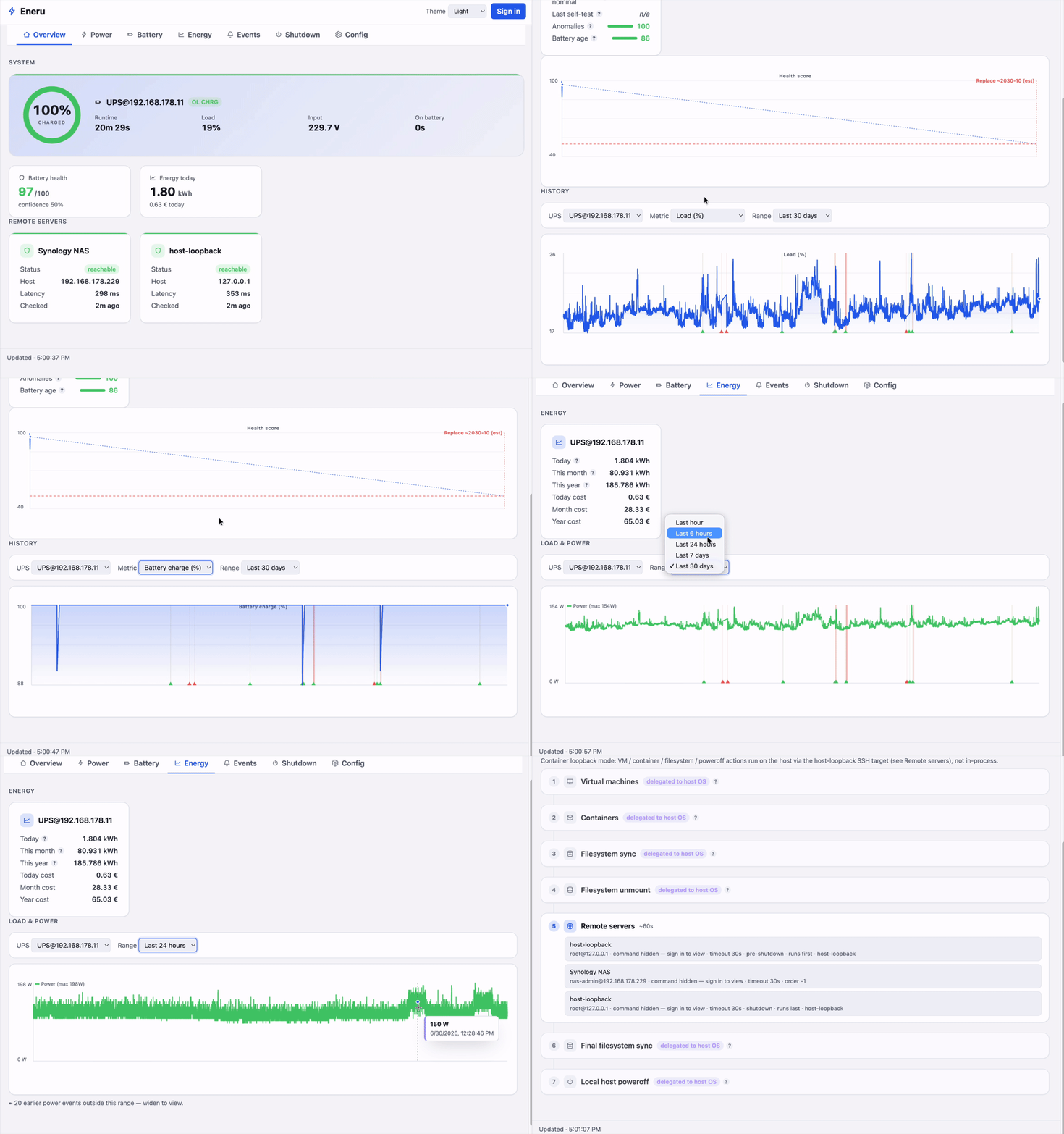
Eneru ships a small browser dashboard served by the embedded API server. There is no external service, build toolchain, or third-party JavaScript. It is a thin client over the REST API: every value it shows comes from an endpoint, and all logic stays server-side.
Enabling it
The dashboard is served automatically whenever the API is enabled. There is no separate switch:
api:
  enabled: true
  bind: "127.0.0.1"   # expose only where you trust the network, or enable auth
  port: 9191
Open http://<host>:9191/ in a browser.
What it shows
- UPS status cards: status badge, battery charge (with a threshold-colored
bar), runtime, and load, from
/api/v1/ups. Click a card to open a detail panel with live status, power quality (input/output/battery voltage, frequencies, temperature), the UPS's configuration, its redundancy-group membership, and remote-health for that source. The detail panel reads a shared config + remote-health snapshot taken once per refresh, so opening it costs no extra requests. - Redundancy groups: a healthy/required rollup (how many member UPSes are currently healthy vs the quorum target), when configured.
- On-battery / shutdown banner: driven by live UPS and redundancy status (not stale events), so it appears when a UPS goes on battery or shutdown is imminent and clears as soon as power returns.
- History graphs: hand-rolled SVG line charts for battery charge, load,
runtime, and input voltage, from
/api/v1/ups/{name}/history, with a range selector (1 hour → 1 year, or All). Charts scale to the panel width and redraw on resize. - Event timeline: power/diagnostic/lifecycle events from
/api/v1/events, with filters for source, event type, and detail text, a range selector, and a Load older button that pages further back through the full retained history. - Delete events: when signed in, select events with the row checkboxes and use Delete selected to remove them (auth-gated; the server enforces it). Only currently-visible selected rows are deleted.
- Control panel: command buttons and writable-variable forms, shown only
when you are signed in and
nut_controlis enabled. The controls reflect the configured command/variable allowlists; the server enforces them regardless of what the UI renders.
The page polls every 10 seconds.
Status and event wording
The dashboard translates NUT status flags and Eneru event identifiers into
plain language. For example, OL CHRG appears as Utility power · Battery
charging, OB LB appears as Battery low · Running on battery, and
POWER_RESTORED appears as Power restored. Safety states take priority, so
FSD appears first as Shutdown in progress even if the UPS also reports
OL or OB.
Vendor-specific status tokens are not hidden. The dashboard appends them as a custom state after any recognized status. This translation happens only in the browser: the REST API, SQLite history, and logs retain the exact NUT values for integrations and troubleshooting. The terminal UI is unchanged.
Theme
A Theme switcher in the header offers System / Light / Dark, persisted in
the browser's localStorage. The default is System, which follows the OS
light/dark preference with no flash (it's pure CSS); choosing Light or Dark pins
the theme regardless of the OS setting.
Authentication
When authentication is enabled, use Sign in to log in
with a local user. The dashboard stores the returned session token in the
browser's sessionStorage and sends it as a Bearer header. There is no
cookie, so there is no CSRF surface. Read views follow the tiered policy (open
unless api.auth.require_for_reads); control actions always require sign-in.
The Sign in button appears whenever auth is enabled — the dashboard re-checks
/api/v1/config on every refresh, so it shows up on its own once auth becomes
active. When auth is off there is nothing to sign into. If a login fails, the
dashboard shows the server's actual reason. Creating a user with eneru user
create auto-enables auth
within seconds, no restart, so signing in works without hand-editing the config.
Security
The HTML is served with a strict Content-Security-Policy (default-src
'self') and X-Content-Type-Options: nosniff. Only the packaged asset names are
servable, so path traversal is not possible. The dashboard assets themselves
contain no secrets. They are static files; sensitive data only ever flows
through the authenticated API.